
Tin Man Server
automate copies, thumbnails, reports, and exports
Designed for automated workflows
Tin Man Server is the command-line companion to Tin Man — a lightweight automation engine for macOS and Windows.
It brings Tin Man’s export, metadata, reporting, and thumbnail features into a fully scriptable environment, allowing productions and post facilities to run automated media workflows with ease.
Tin Man Server is ideal for anyone working with professional camera RAW and production media who needs reliable, automated media workflows.
Supports
Blackmagic RAW • RED RAW • ARRIRAW • Sony RAW • Apple ProRes RAW • Canon RAW • Licensed Apple ProRes and Avid DNx • MOV/MXF/MP4 formats • Image Sequences — and more.
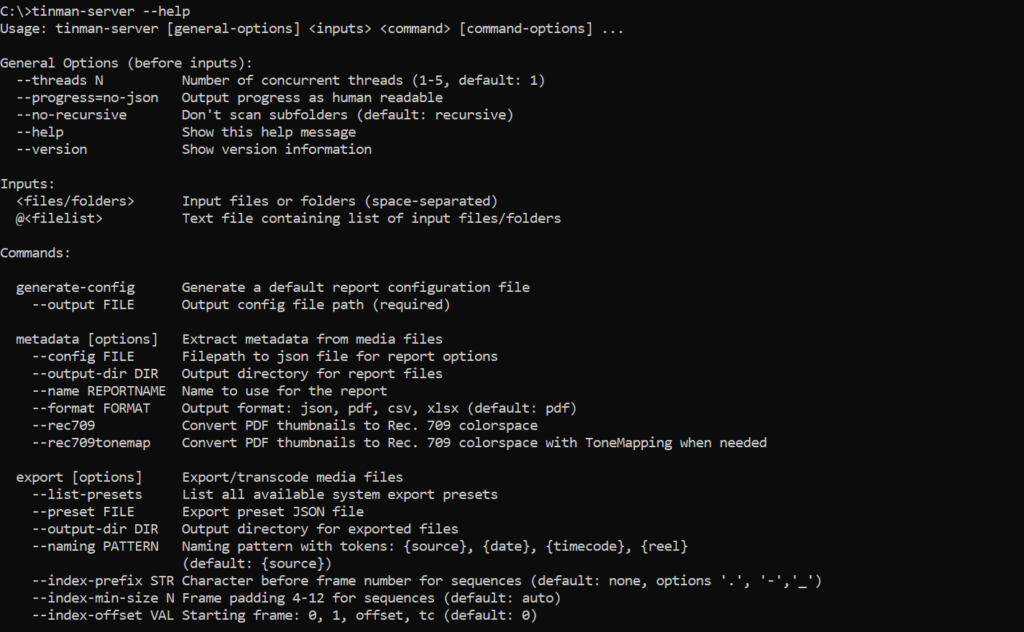
Automate critical tasks
Tin Man Server exposes Tin Man’s core media operations through the command line, allowing you to run batch exports, extract metadata, generate reports, create thumbnails, and perform checksum-verified copies—all optimized for automated, scalable workflows where speed, consistency, and integrity are essential.
Easy to integrate
Tin Man Server fits wherever you need automation. Trigger it from shell scripts, Python tools, Node utilities, render nodes, server daemons, CI pipelines — or use natural language through the Claude Cowork plugin. If your environment can execute a command, it can run Tin Man Server.
Point Tin Man Server at a folder, a file list, or individual clips to automate:
- Batch exports (ProRes, DNx, H.264/H.265, DPX, EXR, and more with 50+ system presets or create custom presets)
- Customizable report generation (HTML, PDF, JSON, CSV, XLSX) including clip and contact sheet reports, with extensive metadata fields that include: scene, reel, take, codec, format, resolution, timecode, etc.
- Thumbnail generation with customizable resolution and naming
- Copying media with verified checksum
Simple, predictable commands
Tin Man Server uses clear, human-readable CLI syntax and supports stacking multiple operations into a single command. For larger workloads, Tin Man Server can run with up to five parallel processing threads, accelerating exports, copies, reports, metadata extraction, and thumbnail generation. Results are structured as JSON, making it easy for automated systems to parse, log, and react to each operation.
Batch Exports
# List all available presets
tinman-server export --list-presets

# Export using system preset
tinman-server --threads 5 /path/footage/ export --preset mov_prores422_hq --output-dir /path/exports/

# Export using custom preset JSON file
tinman-server --threads 3 /path/footage/ export --preset /path/my-preset.json --output-dir /path/exports/
Create Reports
# PDF report (default)
tinman-server --threads 3 /path/footage/ metadata --output-dir /path/reports/

# Multiple formats at once
tinman-server --threads 3 /path/footage/ metadata --output-dir /path/reports/ --format csv pdf xlsx

# Using custom config file
tinman-server --threads 3 /path/footage/ metadata --config my-config.json --output-dir /path/reports/
Generate Thumbnails
# Single thumbnail per file
tinman-server /path/footage/ thumbnail --output-dir /path/thumbs/

# Three evenly distributed thumbnails (start/middle/end)
tinman-server /path/footage/ thumbnail --output-dir /path/thumbs/ --position-count 3

# Rec. 709 Tone-Mapping
tinman-server /path/file.braw thumbnail --output-dir /path/thumbs/ --size 1024 --quality 95 --rec709tonemap
Verified Copies
# Copy single file with verification
tinman-server /path/input.R3D copy --output-dir /path/backup/

# Copy folder preserving structure
tinman-server --threads 5 /path/footage/day1/ copy --output-dir /path/backup/day1/

# Overwrite existing files
tinman-server /path/footage/ copy --output-dir /path/backup/ --overwrite
Command Chaining
# Generate both metadata report and thumbnails
tinman-server /path/input.R3D metadata --output-dir /path/reports/ thumbnail --output-dir /path/thumbs/
Talk To Your Media
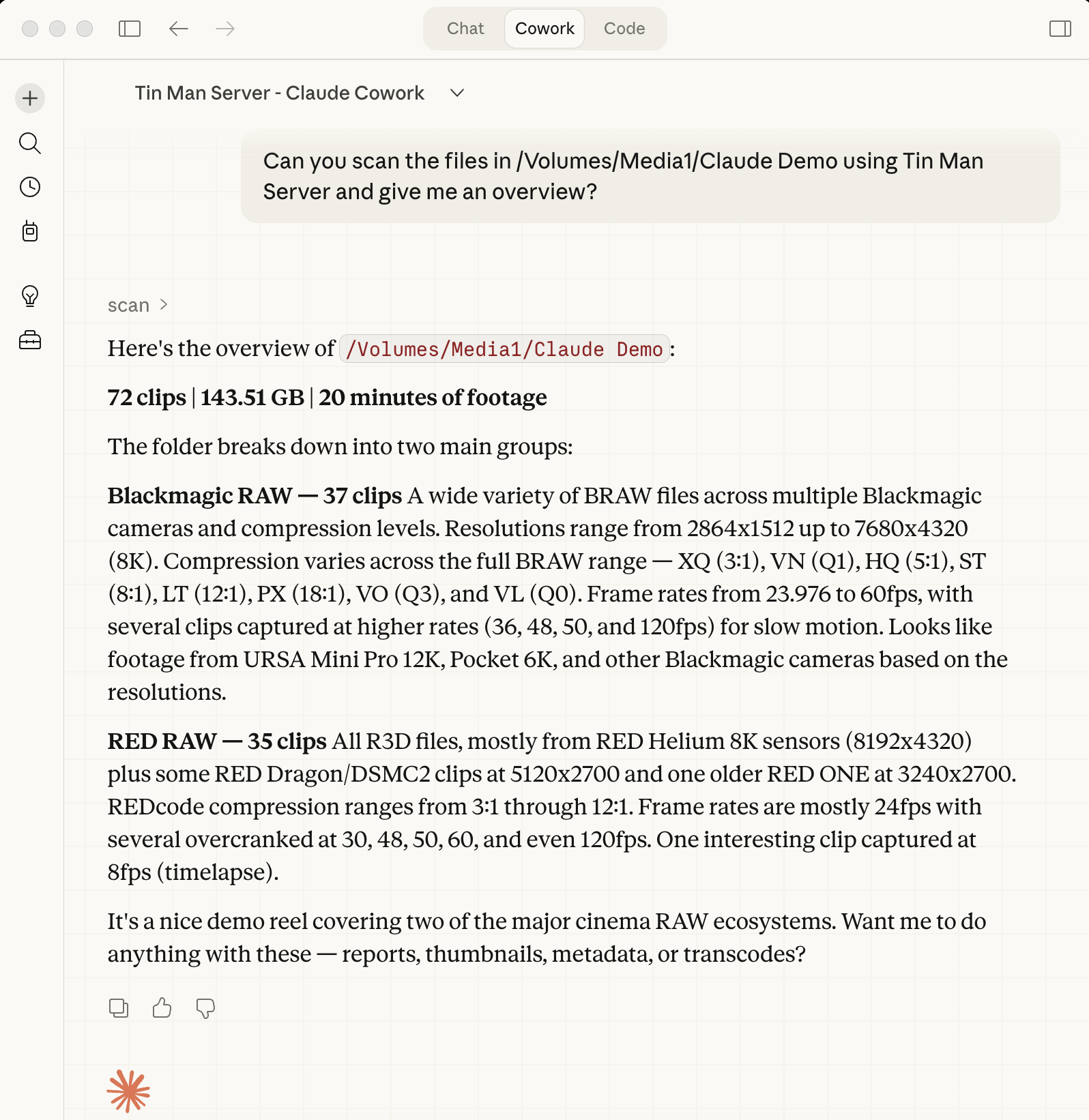
With the new Tin Man Server plugin for Claude Cowork, you can connect Tin Man Server directly into Claude AI. Scan media cards, create reports, transcode dailies — all from a conversation. Build AI-driven post workflows tailored to how your team actually works.
Scan. Report. Transcode. Just Ask.
Documentation
Learn how to automate RAW workflows and integrate Tin Man Server into your production environment.